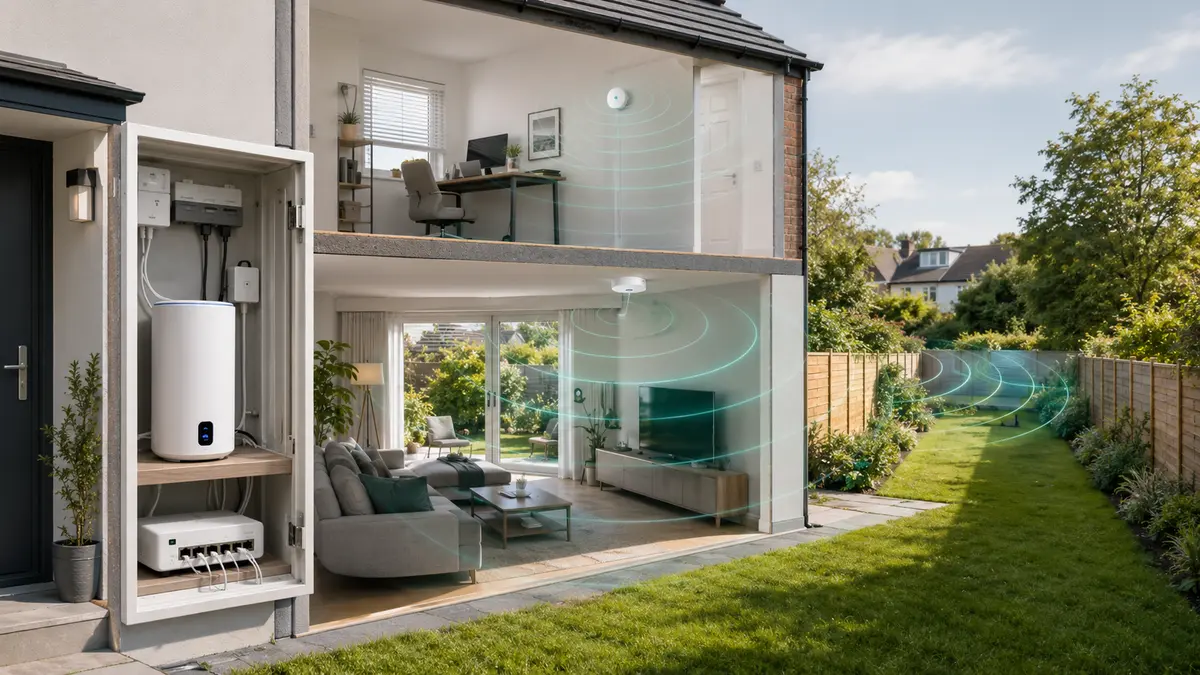
When we moved into our two-bedroom new-build in 2025, Vodafone’s router was installed in the meter cupboard at the front of the house.
The router itself was reasonably capable. The problem was where its Wi-Fi could reach.
The signal was weaker than expected in my office directly above the cupboard, and it did not reach the far end of our approximately ten-metre garden. For a relatively small home filled with connected devices, that was frustrating.
This article contains Amazon affiliate links. As an Amazon Associate I earn from qualifying purchases. This does not affect the price you pay or our verdict.
The result at a glance
| Before | After |
|---|---|
| Vodafone router and extenders | UniFi Dream Router 7 and wired U7 Lite |
| Around 200 Mbps in weaker areas | Generally 500–600 Mbps in the same areas |
| Intermittent extender dropouts | Stable coverage through the house and garden |
| One provider-managed network | Multiple networks, remote management and VPN options |
The internet package did not become faster. The improvement came from distributing that connection more effectively around the house.
Why Vodafone’s extenders did not solve it
Vodafone supplied two extenders and, to be fair, tried to help.
The first worked reasonably well over Ethernet but occasionally dropped its connection. We never established why. The second connected wirelessly as part of a mesh, but performance became slow enough that we were generally better off without it.
I could have continued moving extenders and changing settings. By that stage, though, I wanted a network that could support more than basic coverage.
Our second home changed the calculation
We also have a home in Normandy.
An original UniFi Dream Machine and AC Mesh access point were sitting unused after previously serving our home in the Netherlands. When expensive Starlink service in France was replaced by a much cheaper 2 Gbps Sosh fibre connection, UniFi became an obvious way to improve both properties.
Using the same platform gives us:
- one interface for the UK and French networks
- remote management through the UniFi app and website
- VPN connections between the two homes
- room to add services such as Talk and Protect
We now allow selected devices in France to use the UK connection and selected UK devices to use the French connection. That setup deserves its own article because it took some experimentation.
What I bought
For the UK house I chose:
| Equipment | What I paid | Retailer |
|---|---|---|
| UniFi Dream Router 7 | £290.28 | Amazon, supplied by Scan Computers Ltd |
| UniFi U7 Lite | £90.49 | NetXL |
| UniFi U-POE++ injector | £24.49 | NetXL |
The main router and access-point installation cost £405.26, excluding switches and Ethernet cabling we already owned.
The U7 Lite does not specifically require a PoE++ injector. It is simply the injector I chose for this installation.
This is not the cheapest way to improve home Wi-Fi. The decision was also about network visibility, VPNs, expansion and managing two homes from the same system.
Connecting the UDR7 to Vodafone fibre
Before disconnecting Vodafone’s router, I contacted Vodafone through online chat and requested the broadband username and password required by a third-party router.
Vodafone supplied those details along with a VLAN setting. On our particular Openreach connection, entering that VLAN prevented the UDR7 from connecting. Removing it brought the connection online immediately.
That does not mean every Vodafone customer should leave the VLAN blank. Vodafone uses different wholesale networks and connection requirements can vary. It is only a record of what worked on our line.
Moving the house without disconnecting everything
For the initial changeover, I gave the UDR7 the same Wi-Fi name and password as the Vodafone router.
Most existing devices reconnected automatically, avoiding an evening spent reconfiguring televisions, smart plugs, cameras and connected appliances.
Once the network was stable, I created a new permanent Wi-Fi network and moved devices across gradually. UniFi’s support for multiple wireless networks made that transition much easier.
How the network is connected
The Openreach ONT connects directly to the UDR7 in the meter cupboard.
One connection runs through an existing eight-port Netgear switch and the house’s built-in Ethernet cabling to a second Netgear switch in the living room. That switch serves:
- the Sky puck
- the television
- Home Assistant Green
- the PoE injector and U7 Lite
The U7 Lite faces towards the garden and now covers the living room, the bedroom above and the full garden.
A second Ethernet connection runs from the UDR7’s PoE port to my office. It powers a UniFi G3 Touch Pro desk phone, which passes the connection to another switch serving my Mac mini, work laptop and Canon colour laser printer.
The wider setup is documented on Our Setup.
The improvement was immediate
The fibre speed arriving at the router remained broadly unchanged because the Vodafone package itself had not changed.
Wireless performance inside the house improved substantially. Areas that previously achieved around 200 Mbps now generally reach 500 to 600 Mbps. More importantly, the unexplained dropouts stopped.
The office is better covered, the living room is reliable and Wi-Fi now works at the far end of the garden.
The strongest endorsement is that we no longer have to think about it.
Wi-Fi 7 and the U7 Lite limitation
The UDR7 provides 2.4 GHz, 5 GHz and 6 GHz wireless coverage. We use the 6 GHz connection with compatible devices close to the router.
The U7 Lite operates on 2.4 GHz and 5 GHz rather than extending 6 GHz coverage. It has still met our coverage needs well. With hindsight, I might have waited and spent more on an access point that also extended 6 GHz further through the house.
That is not a criticism of the U7 Lite’s performance. It is a reminder to look beyond the Wi-Fi generation printed on the box and check which frequency bands a particular access point actually supports.
More than a replacement router
Coverage solved the immediate problem. The broader UniFi features are why the system feels worthwhile.
We can see connected devices, separate different types of equipment, manage both homes remotely and create VPN routes between locations. UniFi Teleport also gives us a straightforward way to connect back to the home network while travelling.
The UDR7 can run additional UniFi applications, including Talk and Protect, so the router has become a platform rather than a single-purpose box.
Replacing Vodafone Digital Voice
Removing Vodafone’s router also removed access to Vodafone Digital Voice. The telephone number remained active on the account but only worked through Vodafone’s hardware.
Rather than porting it, we took a new number from AAISP and connected a UniFi G3 Touch Pro to the UDR7. We now use AAISP through UniFi Talk.
That has worked well enough to deserve a separate article, especially for anyone replacing a provider router while wanting to retain a home telephone.
Was it worth it?
The UniFi system would be excessive for somebody who wants to plug in a router and never look at it again.
For us, it delivered:
- faster and more consistent wireless performance
- reliable coverage through the house and garden
- remote management of two properties
- VPN connections between the UK and France
- a foundation for Talk, Protect and future network expansion
It is not an enterprise deployment, and it is not the cheapest consumer solution. It is a capable middle ground for a connected home where visibility, reliability and expansion matter.
Most importantly, the Wi-Fi has become something we no longer have to think about. That is exactly what I wanted.